Introduction to Git and Github!
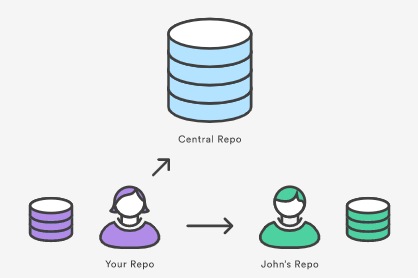
Git is a version control system used to see and access different versions(history) of a file or directory.
Github is a Git repository hosting service/site and it an open-source platform where we can create and host multiple projects.
GIT COMMANDS-
-
Git keeps track of the changes made to the files or directories.
-
Check the latest version by typing
git --versionon Git or Cmd. -
$cat filename1- This command is used to view files and to create them.
- It also shows all the changes made to the file in the past.
-
$diff filename1 filename2- This command compares two files and shows the difference between the two.
-
$diff -u filename1 filename2- It shows the difference between the two files/directories with some context(In unified format).
-
$wdiff- Highlight the words that have changed in a file.
-
$diff -u old_file new_file > change.diff- With this command, we are generating a file(change.diff) with the changes between the two files.
- The > symbol redirects the output of the diff command to a file(change.diff).
-
$patch filename.py < filename.diff- Patch takes a file generated by diff and applies the changes to the original file.
I had some problems using the patch command that comes with MSYS2 on Windows. In my case, both the source file and the patch had CRLF line-ending, and converting both to LF didn't work either. What worked was the following:
$ dos2unix patch-file.patch
$ patch -p1 < patch-file.patch
$ unix2dos modified-files...
$cp file1.py file2.py- cp command is used to create a copy of a file.
- In this case, file2.py is the copied version of file1(original file).
Now setting up the global configuration for the git bash:- - $git config --global user.email “example@gmail.com” - $git config --global user.name “example” - Here the (--global) flag is used to set the above values for all git repositories.
Let’s get started with Git : - We can create a folder using git initcommand or we can clone the project using$git clone website.com` command.
A single task can be done in multiple commands and that’s why future typed commands without description can be Googled! - $cd folderName - $ls -la - $ls -l .git/ - $git add. - This will add all files to the staging area. - To add specific files just add file names with spaces : - $git add file1 file2
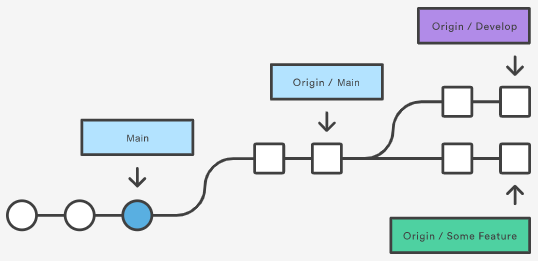
Staging Area:
A file maintained by Git that contains all of the information about what files and changes are going to go into the next commit.
$git status- To see if files are in the staging area or not.
$git commit- To commit the files and write the commit message in the editor.
- To commit without opening the editor
$git commit -m “message”
$git config -l- It lists all configurations of the Git.
$touch filename- To create a new file